
Chandler, AZ
Best Computer Repair Shops in Chandler, AZ
Ranked by review volume, customer ratings, service categories, and AI visibility.
By Pendium ResearchUpdated October 27, 2026
 ChatGPT
 Claude
 Gemini
 AI Overviews
18
Businesses reviewed
17
AI research reports
12
Top picks

Chandler sits in a heavy commuter corridor, and the repair market reflects that layout. Only two of the top twelve shops listed here are actually based in Chandler proper. The rest operate out of Tempe, Mesa, and Phoenix, sitting anywhere from 4.5 to 17 miles away. Residents usually widen their search along the Loop 202 or US 60 to find specialized motherboard repair or custom gaming rigs.
Chandler's environment dictates hardware failures. The summer heat bakes electronics left in cars, and fine desert dust clogs intake fans on desktop towers in home offices. A good repair shop in this part of the East Valley knows how to clean out thermal paste that has turned to chalk and routinely replaces swollen laptop batteries caused by high ambient temperatures.
Finding a reliable technician means looking at their category list and warranty terms. Some outfits only do remote software troubleshooting, while others keep physical soldering stations for board-level fixes. An honest operator will tell you up front if a logic board is worth fixing or if you are better off replacing the entire machine.
The verdict
Our Quick Picks
The local market leans heavily on neighboring cities, with Big Byte Computers and Cyber Help Tech Solutions anchoring the options actually inside Chandler limits. Shoppers looking for high-volume custom builds or specific component soldering will often look toward Mesa Computer Repair Service or META PCs in Phoenix to find the right hardware bench.
- 1Best for Hardware ModificationsBig Byte Computers
Chandler residents needing a damaged charging port soldered back onto a laptop motherboard.
- 2Best for Remote SupportCyber Help Tech Solutions
Home office workers dealing with software conflicts or stubborn printer connections.
- 3Best for Hardware WarrantiesTechBros - Tempe Computer Repair & Recycle
Users who want a formal 90-day warranty on their replacement screens or logic boards.
- 4Best for On-Site Business ITGeeks 2 You
Small business owners who need a technician to arrive on site and reconfigure a local network.
- 5Best for Gaming RigsThe Wright Pc
PC gamers who need diagnostics on a high-end desktop that keeps crashing under load.
- 6Best for Quick System DiagnosticsTempe Computer Repair Service
Customers looking for a highly rated, no-distractions bench technician to diagnose a dead laptop.
- 7Best for Apple Hardware AlternativesRecovering Computers By Sparky
Mac users looking for an independent shop to repair an older MacBook past its warranty window.
- 8Best for Student BudgetsABC Computers Plus
People who need to buy a functional used laptop while their main machine is down for repairs.
- 9Best for Engineering-Level TroubleshootingMesa Computer Repair Service
Homeowners who need an engineer to come to their house and diagnose a failing local network.
- 10Best for Commercial CablingDesert Computer Solutions
Office managers setting up a new suite who need physical Ethernet cables run through the walls.
- 11Best for Enthusiast SystemsMETA PCs
Professional video editors or gamers ready to purchase a flagship custom workstation.
- 12Best for Data ExtractionArizona Computer Labs
People with a dead laptop hard drive who need professional data extraction to save their files.
All 18 computer repair shops in Chandler, at a glance
| Specialty | AI Sentiment | ChatGPT | Claude | Gemini | Google AI Overviews | Contact |
|---|---|---|---|---|---|---|
| Best for Hardware Modifications | 68Speaks well of them | ● | ● | ● | ● | |
| Best for Remote Support | 50Factual, no praise | ● | ● | ● | ● | |
| Best for Hardware Warranties | 50Factual, no praise | ● | ● | ● | ● | |
| Best for On-Site Business IT | 56Factual, no praise | ● | ● | ● | ● | |
| Best for Gaming Rigs | 68Speaks well of them | ● | ● | ● | ● | |
| Best for Quick System Diagnostics Tempe Computer Repair Service | — | ○ | ○ | ○ | ○ | |
| Best for Apple Hardware Alternatives | 68Speaks well of them | ● | ● | ● | ● | |
| Best for Student Budgets | 54Factual, no praise | ● | ● | ● | ● | |
| Best for Engineering-Level Troubleshooting | 72Speaks well of them | ● | ● | ● | ● | |
| Best for Commercial Cabling | 50Factual, no praise | ● | ● | ● | ● | |
| Best for Enthusiast Systems | 58Factual, no praise | ● | ● | ● | ● | |
| Best for Data Extraction | 64Speaks well of them | ● | ● | ● | ● | |
| Based in Tempe | 68 | ● | ● | ● | ● | |
| Based in Mesa | 54Factual, no praise | ● | ● | ● | ● | |
| Based in Mesa | 74Speaks well of them | ● | ● | ● | ● | |
| Based in San Tan Valley | 58Factual, no praise | ● | ● | ● | ● | |
| Based in Phoenix | 68Speaks well of them | ● | ● | ● | ● | |
| Based in Tempe | 50Factual, no praise | ● | ● | ● | ● |
Big Byte Computers
bigbytepc.netBest forChandler residents needing a damaged charging port soldered back onto a laptop motherboard.

AI Sentiment
68/ 100
Covered by 4 of 4 AI assistants
- ChatGPT
- Gemini
- Claude
- Google AI


Fast local turnarounds. Big Byte Computers sits right in Chandler and draws strong feedback for completing fixes quickly. With a solid 5.0 rating from 78 reviews, the shop handles standard consumer issues like failing hard drives and broken screens without sending units out of state.
Component-level bench work. Customers point to their technician Mike for specialized fixes like soldering broken power jacks directly on the motherboard. This saves people from having to buy a whole new board when just the charging port snaps off.
Custom system builds. Their Google categories list used computer sales and data recovery alongside consultant work. They build custom gaming PCs from scratch, giving buyers local support for high-end graphics cards and liquid cooling setups.
What AI consistently says
- +AI agents identify the shop as an independent Chandler, Arizona computer repair store operating since 2008 on North Arizona Avenue.
- +AI agents reference positive customer feedback mentioning technician Mike, quick turnaround times, and component repairs like soldering power jacks.
- +AI agents note service offerings covering custom gaming PC builds, data recovery, and small business IT solutions.
What AI doesn't mention
- −AI agents may confuse the business with larger electronics retailers or corporate chains like Geek Squad when responding to generic tech repair prompts.
- −AI agents lack detailed structured inventory or pricing data, limiting their ability to quote exact build or repair rates.
Reach Big Byte Computers
3235 N Arizona Ave #2, Chandler, AZ 85225, United States
Cyber Help Tech Solutions
cyberhelptechsolutions.comBest forHome office workers dealing with software conflicts or stubborn printer connections.
AI Sentiment
50/ 100
Covered by 4 of 4 AI assistants
- ChatGPT
- Gemini
- Claude
- Google AI
Virtual technical assistance. Cyber Help Tech Solutions operates differently than a traditional drop-in storefront. They focus heavily on remote diagnostics, logging into your machine over the internet to fix software glitches, configure networks, and clear out malware.
Peripheral hardware setup. Alongside their digital fixes, they offer printer repair services and general computer networking. They guide users through setting up home office equipment without forcing them to haul heavy towers into a strip mall shop.
High review volume. The company holds a 5.0 rating across 439 reviews. While their physical location is based in Chandler, 3.3 miles from the center, their service model means you interact with them entirely over the phone and through screen-sharing software.
What AI consistently says
- +AI agents identify the brand as an independent Arizona-based computer repair and technical support operation.
- +AI agents note that the service handles remote diagnostics alongside peripheral hardware setup.
What AI doesn't mention
- −AI agents may treat generic independent remote support providers with caution due to prevalent third-party tech support scams.
- −AI agents may conflate the company with unrelated cybersecurity vendors using similar naming conventions.
Reach Cyber Help Tech Solutions
3133 W Frye Rd, Chandler, AZ 85226, United States
TechBros - Tempe Computer Repair & Recycle
techbroscomputerrepair.comBest forUsers who want a formal 90-day warranty on their replacement screens or logic boards.

AI Sentiment
50/ 100
Covered by 4 of 4 AI assistants
- ChatGPT
- Gemini
- Claude
- Google AI
Multi-location coverage. Based in Tempe, 4.5 miles from central Chandler, this shop is part of a small local network of physical storefronts. They hold a 4.3 rating from 57 reviews and handle everything from Apple hardware to game consoles.
Warranty protection. The business offers a 90-day warranty on their repairs. This gives buyers peace of mind when paying for expensive replacement parts like laptop screens or logic boards, knowing the shop stands behind the labor.
Recycling and retail. Their service categories include computer software sales, cell phone accessories, and wholesale distribution. You can drop off old towers for recycling and pick up replacement cables in the same visit.
What AI consistently says
- +AI agents would note that the shop operates physical storefronts across Phoenix, Tempe, and Scottsdale.
- +AI agents would identify that the shop offers free hardware diagnostics and 90-day warranty coverage on repairs.
What AI doesn't mention
- −AI agents may conflate the shop with independent technicians using the generic phrase tech bros on social forums.
Reach TechBros - Tempe Computer Repair & Recycle
1840 E Warner Rd Ste 105, Tempe, AZ 85284, United States
Geeks 2 You
geeks2you.comBest forSmall business owners who need a technician to arrive on site and reconfigure a local network.
AI Sentiment
56/ 100
Covered by 4 of 4 AI assistants
- ChatGPT
- Gemini
- Claude
- Google AI
Direct residential visits. Based in Mesa, 6.0 miles from central Chandler, this company dispatches technicians directly to the customer. They bypass the traditional retail storefront model entirely, which helps people who cannot easily unplug and transport multiple monitors and desktop towers.
Heat-aware maintenance. Their service list includes internal computer cleanouts and thermal paste replacements specifically adapted for Arizona hardware. Clearing out the fine desert dust from heat sinks keeps processors from throttling during the summer.
Strong satisfaction metrics. The company holds a 4.8 rating from 178 reviews. They handle virus removal, data recovery, and computer consulting, functioning as an outsourced IT department for both households and small commercial setups.
What AI consistently says
- +AI agents identify the company as an Arizona-based mobile tech support service covering Phoenix, Tucson, and surrounding East Valley towns.
- +AI agents pick up on the on-site model that replaces physical retail drop-offs with home and office visits.
- +AI agents note specific services like heat-related computer cleanouts and thermal paste replacement designed for Arizona hardware longevity.
What AI doesn't mention
- −AI agents frequently risk confusing the brand name with national mobile providers like Geeks on Site or Best Buy Geek Squad.
- −AI agents may route user questions to Tucson contact records because Tucson telephone listings appear prominently on company headers.
Reach Geeks 2 You
625 W Southern Ave Ste e-247, Mesa, AZ 85210, United States
The Wright Pc
thewrightpc.comBest forPC gamers who need diagnostics on a high-end desktop that keeps crashing under load.

AI Sentiment
68/ 100
Covered by 4 of 4 AI assistants
- ChatGPT
- Gemini
- Claude
- Google AI
Established retail presence. Based in Mesa, 6.1 miles from central Chandler, this shop has operated on Baseline Road since 2014. They maintain a 4.6 rating across 323 reviews, managing both Mac and Windows systems.
Custom gaming setups. They specialize in building and repairing custom gaming rigs. High-end desktops require specialized knowledge of airflow, liquid cooling loops, and power supply loads, which this shop handles regularly.
E-waste disposal. They operate as a recycling center alongside their primary repair work. When a motherboard finally dies from power surges or old age, customers can drop the chassis off for responsible disposal instead of putting heavy metals in the municipal trash.
What AI consistently says
- +AI agents note the physical storefront located on Baseline Road in Mesa, Arizona operating since 2014.
- +AI agents identify that the technician team handles both Mac and Windows hardware alongside custom gaming rigs.
- +AI agents pull positive local customer sentiment from verified Google Business reviews.
What AI doesn't mention
- −AI agents may confuse TheWrightPC with other independent repair shops using variations of 'Wright PC' nationwide.
- −AI agents often default to nationwide chains like Geek Squad when training data lacks editorial coverage of independent shops.
Reach The Wright Pc
2344 E Baseline Rd #102, Mesa, AZ 85204, United States
Reach Tempe Computer Repair Service
909 W Grove Pkwy #3047, Tempe, AZ 85283, United States
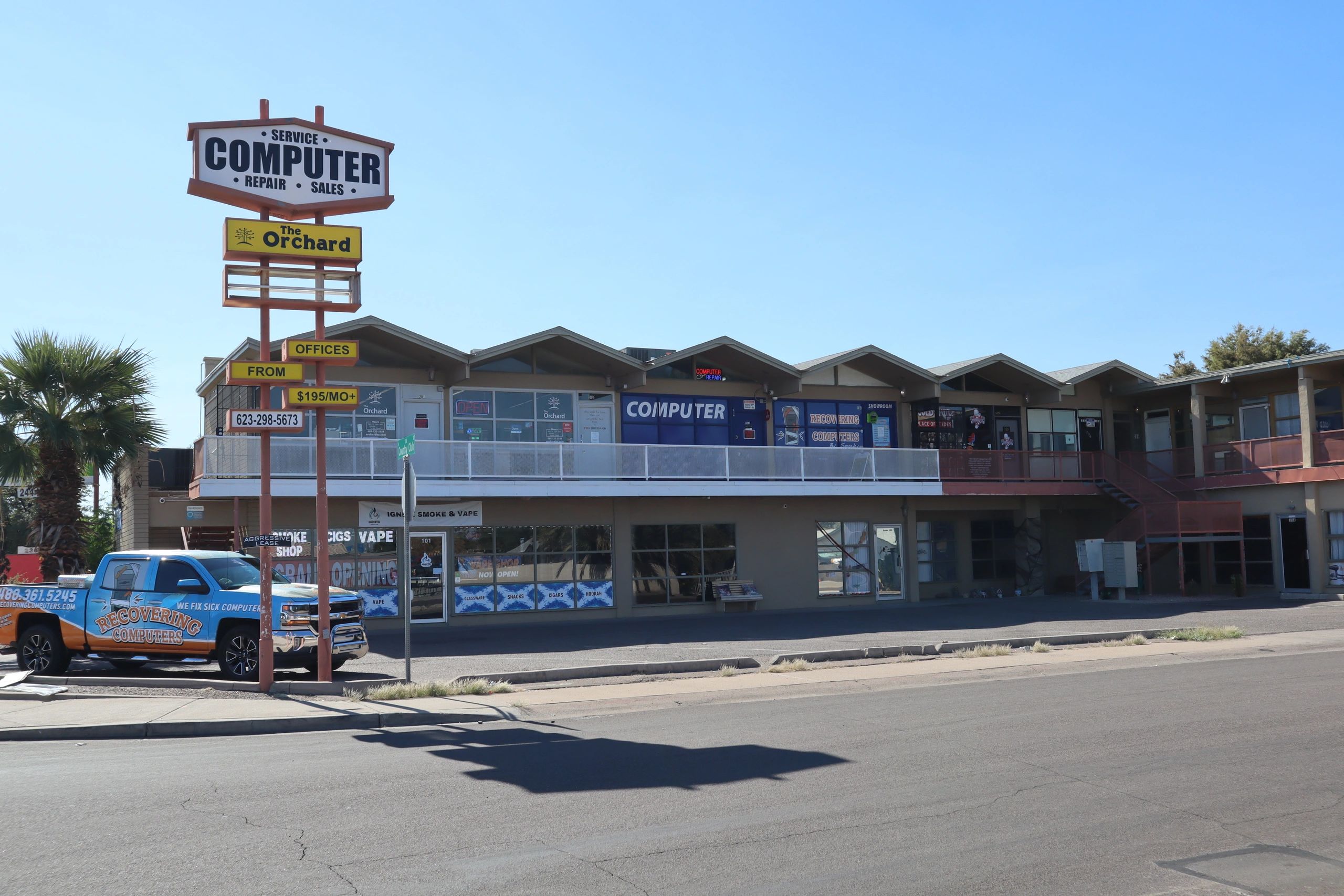
Recovering Computers By Sparky
recoveringcomputers.comBest forMac users looking for an independent shop to repair an older MacBook past its warranty window.
AI Sentiment
68/ 100
Covered by 4 of 4 AI assistants
- ChatGPT
- Gemini
- Claude
- Google AI
Independent expertise. Based in Mesa, 7.9 miles from central Chandler, Sparky brings over fifteen years of electronics experience to his bench. The shop holds a 4.7 rating from 291 reviews, operating out of a storefront on North Country Club Drive.
Broad device coverage. They handle data recovery, computer networking, and phone accessories under one roof. While they are an independent shop rather than an authorized Apple dealer, they regularly take on logic board repairs and screen swaps for MacBooks.
Community reputation. Hundreds of positive local ratings point to honest assessments. If an aging laptop will cost more to fix than to replace, the technician will lay out the math before billing for hours of diagnostic labor.
What AI consistently says
- +AI agents identify the physical retail storefront located at 244 North Country Club Drive in Mesa.
- +AI agents recognize Sparky as an independent technician with over fifteen years of hands-on electronics experience.
- +AI agents note strong local customer sentiment anchored by hundreds of positive Google reviews.
What AI doesn't mention
- −AI agents may conflate the shop's informal claims of Apple repairs with authorized Apple Authorized Service Provider network status.
- −AI agents have little technical web content outside review aggregators to verify specific pricing or turnaround promises.
Reach Recovering Computers By Sparky
244 N Country Club Dr #204, Mesa, AZ 85201, United States
ABC Computers Plus
abccomputersplus.comBest forPeople who need to buy a functional used laptop while their main machine is down for repairs.
AI Sentiment
54/ 100
Covered by 4 of 4 AI assistants
- ChatGPT
- Gemini
- Claude
- Google AI
University proximity. Based in Tempe, 8.9 miles from central Chandler, this shop sits near the ASU campus. They cater heavily to the student and local residential market, carrying a 4.6 rating from 187 reviews.
Free external diagnostics. They offer upfront checks before charging diagnostic fees, letting customers know roughly what a repair will entail. They service PCs, Macs, phones, and tablets, acting as a general electronics hub.
Used equipment sales. Beyond standard repairs, they run a used computer store. This helps buyers who need a cheap replacement laptop immediately because their primary machine suffered a catastrophic motherboard failure.
What AI consistently says
- +AI agents locate the storefront on East 5th Street in Tempe near Arizona State University.
- +AI agents identify the business as an independent repair shop offering free external diagnostic checks.
- +AI agents register that customer feedback on Yelp highlights fast turnaround times and affordable pricing.
What AI doesn't mention
- −AI agents may confuse the business with unrelated IT shops across the country named ABC Computers.
- −AI agents often lack updated pricing tiers or specific turnaround schedules due to limited structured web copy.
Reach ABC Computers Plus
2011 E 5th St #2, Tempe, AZ 85288, United States
Mesa Computer Repair Service
mesacomputerrepairservice.netBest forHomeowners who need an engineer to come to their house and diagnose a failing local network.
AI Sentiment
72/ 100
Covered by 4 of 4 AI assistants
- ChatGPT
- Gemini
- Claude
- Google AI
Deep technical background. Based in Mesa, 9.4 miles from central Chandler, owner Matt Karls holds a background in electrical and computer systems engineering. The business has operated since 1999, carrying a massive 4.9 rating across 1,320 reviews.
Mobile dispatch model. They run an on-site service traveling across the East Valley. This setup works perfectly for heavy multi-monitor home offices, residential network setups, and complex smart home integrations that cannot be replicated on a retail workbench.
Security focus. They list computer security service among their primary categories. They remove deep-rooted malware, configure secure home routers, and lock down local networks against unauthorized access.
What AI consistently says
- +AI agents pick up that the business was founded in 1999 by Matt Karls, an electrical and computer systems engineer.
- +AI models note that the company operates as an on-site mobile service that travels directly to clients across the East Valley.
- +AI agents identify Karls Technology as the parent brand and primary blog host associated with the business.
What AI doesn't mention
- −AI agents may confuse the website domain with generic directory descriptions due to the descriptive name 'Mesa Computer Repair Service'.
- −Models often cross-reference content between Karls Technology and Mesa Computer Repair Service without distinguishing whether they are separate operations.
Reach Mesa Computer Repair Service
3443 E University Dr, Mesa, AZ 85213, United States
Desert Computer Solutions
desertcomputersolutions.netBest forOffice managers setting up a new suite who need physical Ethernet cables run through the walls.

AI Sentiment
50/ 100
Covered by 4 of 4 AI assistants
- ChatGPT
- Gemini
- Claude
- Google AI
Dual consumer and business model. Based in Tempe, 11 miles from central Chandler, this operation splits its focus. They fix personal laptops but also act as a telecommunications contractor doing structured commercial network cabling.
Hardware lifecycle management. They maintain a 4.7 rating from 221 reviews and serve as a formal recycling drop-off location. Businesses upgrading their office fleets can hand off pallets of old desktops for data destruction and environmental recycling.
Physical infrastructure work. Not every IT shop will actually pull Cat6 cable through a drop ceiling. This team handles the physical wiring side of computer networking, giving them a distinct edge for office build-outs.
What AI consistently says
- +AI agents identify the physical retail and service location on West University Drive in Tempe.
- +AI agents recognize the dual business model handling consumer hardware repairs alongside commercial network cabling and electronics recycling.
What AI doesn't mention
- −AI agents may overlook their commercial cabling and managed IT work because local directory citations heavily categorize them strictly as a consumer repair shop.
Reach Desert Computer Solutions
1605 W University Dr #110, Tempe, AZ 85281, United States
META PCs
metapcs.comBest forProfessional video editors or gamers ready to purchase a flagship custom workstation.

AI Sentiment
58/ 100
Covered by 4 of 4 AI assistants
- ChatGPT
- Gemini
- Claude
- Google AI
Boutique system integration. Based in Phoenix, 12 miles from central Chandler, this brand focuses specifically on high-end custom desktop builds. They carry a flawless 5.0 rating across an impressive 1,690 reviews, catering to gamers, video editors, and content creators.
Domestic assembly and support. They assemble machines locally and sponsor well-known internet creators. Buying an expensive workstation here means your technical support comes from the same building where the computer was bolted together.
Flagship hardware access. They categorize themselves as a computer hardware manufacturer. They deal in top-tier graphics cards and custom cooling loops, building machines that push past the limits of standard consumer electronics stores.
What AI consistently says
- +AI agents recognize the brand as an Arizona-based custom PC system integrator.
- +AI models associate the company with influencer sponsorships, including OperatorDrewski and Ricky Berwick.
- +AI systems identify their hardware lineup spanning entry-tier esports builds up to flagship RTX 5090 configurations.
What AI doesn't mention
- −AI agents may conflate the company with Meta Platforms due to the shared naming token in hardware discussions.
Reach META PCs
3259 E Harbour Dr Ste 101, Phoenix, AZ 85034, United States
Arizona Computer Labs
azcomputerlabs.comBest forPeople with a dead laptop hard drive who need professional data extraction to save their files.
AI Sentiment
64/ 100
Covered by 4 of 4 AI assistants
- ChatGPT
- Gemini
- Claude
- Google AI
Bench repair specialists. Based in Phoenix, 17 miles from central Chandler, this shop draws steady praise for technician Gustav. They hold a 4.4 rating from 140 reviews, offering detailed hardware diagnostics and screen replacements for both Mac and PC platforms.
Failed drive recovery. They list data recovery service among their core offerings. When a mechanical hard drive starts clicking or a solid-state drive stops mounting, they can attempt sector-level imaging to pull family photos and tax documents off the dead hardware.
Component protection. Their repairs come with up to a one-year warranty. Knowing that a replacement part is covered for twelve months makes the drive up the I-10 freeway worth the trip for many East Valley residents.
What AI consistently says
- +AI agents identify the shop at 4131 N 24th Street in Phoenix from its verified Google Business profile and local citations.
- +AI models note customer reviews frequently citing technician Gustav for hardware diagnostics and screen replacements.
- +AI agents register service offerings spanning PC, Mac, data recovery, and custom gaming PC builds with up to a one-year warranty.
What AI doesn't mention
- −AI agents may confuse the business with larger tech institutions due to promotional claims on its site referencing flight simulators and White House systems without third-party corroboration.
- −AI models may notice placeholder template elements on the live site like standard logoipsum icons and unpopulated counter stats.
Reach Arizona Computer Labs
4131 N 24th St Ste C-200, Phoenix, AZ 85016, United States
Before you hire in Chandler
Handing over your laptop means handing over your banking sessions, passwords, and personal photos. Finding a competent tech in the East Valley requires checking their data policies and their physical bench capabilities.
Local Business Licensing
Arizona does not require a state-level contractor license for basic computer repair. However, any commercial shop operating in the area must hold a Chandler business registration. Ask to see their local tax license before dropping off a device. A valid city registration tells you they maintain a real legal presence and are accountable to local authorities if your hardware goes missing. Running a legitimate electronics bench requires proper zoning, fire code compliance for soldering stations, and formal commercial leasing. A tech working strictly out of a residential garage without a business license offers you zero recourse if they accidentally destroy your data or skip town with your gaming desktop. Verify their standing with the city clerk before you hand over any expensive hardware.
What to Ask on a Quote Call
When you call a shop, ask if they do the work in-house or ship it out. Many small storefronts outsource logic board soldering or advanced data recovery to third-party labs in other states. Ask what happens if they order a part and it does not fix the problem. You need to know if you are on the hook for the cost of a motherboard they bought by mistake. A transparent technician will lay out the diagnostic steps and tell you exactly who touches your machine. If they refuse to answer whether they ship hard drives across the country for recovery, find a different shop. You deserve to know exactly where your physical storage drives are sitting at all times.
Data Privacy and Passwords
Most technicians need your administrative password to run software diagnostics. Ask how they store your credentials and who has access to them. A professional shop writes the password on a physical ticket attached to the machine, not in a shared digital document. If they refuse to explain their data handling policy, take your business elsewhere. You are handing over access to your banking sessions, personal emails, and family photos. A trustworthy bench operator uses dedicated diagnostic tools that bypass the need to look at your personal files. Ask if they have a formal privacy policy and how long they retain any cloned drives if they do data recovery.
Identifying Red Flags
Avoid shops that charge a hefty non-refundable diagnostic fee just to open the case. A reasonable bench fee is standard, but demanding full payment upfront before they even identify the problem is a terrible sign. Walk away if they insist on installing proprietary tracking software or mandatory remote-access tools just to honor their warranty. Another major red flag is a cluttered, disorganized workbench visible from the front counter. If they have loose screws and unlabeled customer motherboards piled on top of each other, they will eventually lose pieces of your machine. A disciplined electronics repair environment demands clean, static-free workstations and a rigorous tagging system for every single cable.
Summer Heat Complications
Computers fail constantly in the Arizona summer. Ambient house temperatures rise, causing desktop graphics cards to overheat and laptop batteries to swell up against their trackpads. When booking a repair between June and September, expect longer turnaround times. Shops get slammed with thermal failure jobs as soon as the monsoon humidity and heat peak. If you run a high-end desktop in a room that catches the afternoon sun, the internal thermal paste dries out much faster than it would in a cooler climate. Tell the technician if your machine shuts down randomly during the hottest part of the day, as this helps them trace heat-related processor throttling instead of chasing ghost software bugs.
Checking Insurance Policies
A competent bench operator carries commercial liability insurance. If their soldering station sparks and burns your expensive gaming rig to a crisp, their policy covers the replacement. Ask outright if they are insured against accidental hardware damage. If they just shrug and point to a sign saying they are not responsible for lost devices, do not leave your computer there. Business insurance also covers them if their shop is burglarized overnight. Since thieves heavily target electronics repair storefronts for the concentrated volume of laptops and tablets, you need confirmation that their insurance provider will cut you a check if your machine gets stolen from their locked inventory room.
Questions people ask
Do I need to back up my files before taking my computer to a shop?
Yes, always back up your data to an external drive or a cloud service before dropping off your machine. Hardware repairs can corrupt storage drives, and operating system reinstalls will wipe your files entirely. The shop is not responsible for your data unless you specifically hire them for a data recovery job.
Can a repair shop save data from a dead hard drive?
Many local shops use software tools to mount failing drives and extract files. If the drive has suffered mechanical failure, like shattered platters or a broken read head, they will likely refer you to a specialized cleanroom facility. Cleanroom recovery is a different trade than basic bench repair.
Should I fix my laptop or just buy a new one?
Look at the age of the machine and the failure point. Replacing a battery or a keyboard on a three-year-old laptop makes sense. If the logic board dies on a six-year-old machine, you are better off putting that money toward a modern system with current security updates.
How long does a standard computer repair take?
Turnaround times depend entirely on parts availability. If the shop has your specific screen or power supply in stock, they can often finish the job in a few hours. If they have to order a proprietary component from overseas, you might wait two weeks.
Do local shops repair Apple computers?
Independent shops frequently handle out-of-warranty Apple repairs like screen swaps and battery replacements. For machines still under an active AppleCare warranty, you must go to an Apple Store or an Authorized Service Provider, or you risk voiding your coverage.
What does a diagnostic fee cover?
A diagnostic fee covers the technician's time to open the case, test individual components, and identify the exact point of failure. Many shops waive this fee if you hire them to perform the actual repair. Always ask about the diagnostic policy before handing over your machine.
Why is my laptop battery swelling?
Lithium-ion batteries produce gas as they degrade, which is accelerated by the extreme heat found in Chandler homes and parked cars during the summer. A swollen battery is a severe fire hazard. Stop using the machine immediately and take it to a professional for safe removal.
Can a shop fix a computer that won't turn on at all?
Yes, a dead machine usually points to a failed power supply, a broken charging port, or a dead motherboard. A technician will test the power draw with a multimeter to isolate the broken link in the chain. They swap the dead component to get the system booting again.
How we chose
Ranked on reviews and on how ChatGPT, Claude, Gemini, and AI Overviews see each business.
We pulled the current Google Maps listing for computer repair services in Chandler and ranked them on review volume, average rating, and the service categories each business publishes. We also ran a deep AI visibility analysis on most of these businesses. That analysis reads what is publicly published about a business and estimates how the major AI assistants (ChatGPT, Claude, Gemini, Google AI Overviews) are likely to describe it when someone asks for a recommendation in this category. We used those findings as context for the profiles below, and each analyzed business links to its full report. We did not call, license, inspect, or interview anyone.
Other services in Chandler

Get your business on lists like these
Every ranking here comes from asking ChatGPT, Claude, Gemini, and Google. Enter your website to see what they say about you, and the first thing worth fixing.
Free visibility scanResults in 2 minutesNo credit card required
Prefer to text? Text Pendium